Postgresql database has come a long way since its initial release. One of the feature that can come in very handy in handling database that are located across geographical region is multi-master replication. The idea is to provide localised access to the database for each sites and yet still maintain a single view of the database. There are two solution that can get this done rather painlessly.
Option 1: BDR
This is a new replication solution by second quadrant. Still in beta but the ease of installation is very promising. The quirks:
a. Some of the database administrative functions are rendered inoperative.
b. A global sequence need to be explicitly set during table creation. Otherwise, would have a lot of write failure as the sequences are being replicated asynchronously.
c. Need a patched version of Postgresql 9.4.
Option 2: Bucardo
This solution has been around for quite sometime and is quite stable. The latest version which is 5.4 added support for multi-masters. The quirks:
a. DDL is not replicated. Any update to DDL need to be manually handled across all nodes.
b. Sequences is not replicated. A good strategy is to increment the sequence by the number of nodes installed.
Personally I prefer BDR solution as DDL and sequences replication can make deployment so much easier.
Sunday, 17 January 2016

Friday, 16 January 2015
Troubleshooting Web Application Memory Problem
A lot of web based framework from both open source and branded vendors are frequently used in black box fashion for developing web applications. Everything worked perfectly during testing, however in production it intermittently crashed with out of memory error. Most developers would just add "-Xms2048m -Xmx2048m -XX:PermSize=256m -XX:MaxPermSize=256m" and the problem went away until the next crash. Once daily crashes started to occur often enough, the next typical ingenious solution is to restart the web application every day using a scheduler. Sometimes even twice in a day.
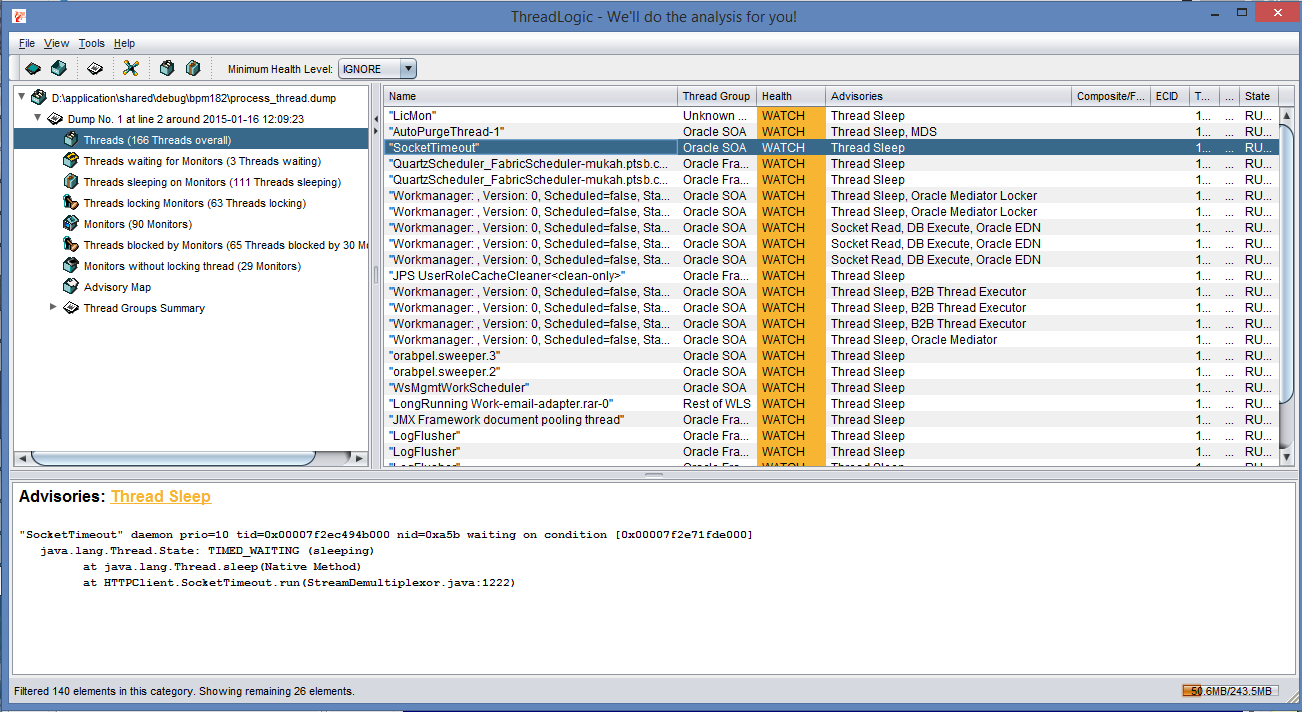
There is a better way. It involves looking at memory and thread dump to see what was actually going on under the hood and fix the problem! The steps involved are actually quite simple.
1. Look for java process id.
jps -l
2. Do a thread dump.
jstack

Friday, 9 January 2015
Exploring Java Development using Play 2 Framework
Play 2 is a very interesting framework as both Java and Scala language can be used interchangeably in the same project for developing web application. Basically, it follows MVC pattern but breaks a couple of in grained java programming practices if one is well versed with Spring and J2EE development framework. For a more in dept analysis of this framework, I've decided to use it to implement a production grade SaaS application. Over the past one year, as new features were added and bugs fixed, the SaaS application was tinkered along the way to keep in line with each release of Play 2 framework. The current development environment is as follows:
- Source Code Repository: GIT at bitbucket.org
- Repository Manager: Artifactory 3.4.0
- JVM: Oracle JDK 1.7
- IDE: Eclipse Luna with Scala IDE plugin
- Database: Postgresql 9.3
- ORM: JPA 2.1 and Hibernate 4.3.6
- Security Framework: Social Secure master-snapshot
- Scala: 2.11.1
- Charting: DS3.js
- Template: Bootstrap 3
The features that have been implemented are:
- Internationalization
- AJAX invocation
- Bootstrap 3 based custom components
- Segregation of functions into modules
- Custom login page and authorization provider for Social Secure
- Front end javascript validation
- Date and numeric field formatting
- Optimized bulk insert and loading of data
The positives:
- Building a working CRUD page is much faster than with JSF-Spring-JPA. Scala template is simpler than JSF.
- The performance is very good. The generated code is less cluttered when compared to JSF. Much easier to manipulate it through jQuery and unlike JSF do not have to synchronize the state with the server side managed bean.
- Much easier to add customized components. Just drop the HTML code in a scala wrapper method.
- No need to restart the server when adding the new code.
- Auto-binding of the form data.
- Akka
The negatives:
- Compilation can be slow. 105 scala sources and 87 java sources, take up to 2 minute to compile from a clean state. Much faster on subsequent compilation. Depending on the changes, some still trigger a lot of recompilation.
- A lot of jar files are added via the transitive dependency. Currently stands at over 60 jars.
- Scala IDE with Eclipse Luna is not working well. Occasionally some jar files could not be cleared until Eclipse is closed. Turning on "Build Automatically" can cause problem when compiling using the command line, activator compile.
Thursday, 8 January 2015
Configuring Pentaho CE 5.2 to work with Oracle 12c
Pentaho is just awesome. The fact that it is open source make it really useful for SME that do not have a massive budget. Although its UI may not be flashy and polished, it comes with a suite of powerful tools that can get the job done really well. During recent work on mining data from various database, Oracle 12c seems to be the most problematic to get it working. After experimenting with various configuration, finally got them to talk using JNDI setup.
1. Oracle 12c Configuration
On the Oracle 12c server, the tnsname is configured as follows:
* JUPITER - CDB database
* PDBJUPITER - PDB database
2. Installing Oracle JDBC Driver in Pentaho
Copy the Oracle JDBC driver, ojdbc7.jar from
<ORACLE_INSTALLATION_PATH>/product/12.1.0/dbhome_1/jdbc/lib/
to
<PENTAHO_INSTALLATION_PATH>/lib/
Note: Copy the ojdbc6.jar instead if using JDK 1.6
3. Pentaho DI 5.2 - Spoon Configuration
Locate jdbc.properties file at data_integration/simple_jndi folder. After adding the configuration for Oracle 12c, it becomes as follows:
* PdbJupiter - JNDI name
* pdbjupiter - PDB database
* biadm - A normal user created for PDB
Launch Spoon, go to Tools -> Repository -> Explore -> Connections and add the connection to Oracle 12c as shown in the screen below.

Spoon should now be able to extract and load data from Oracle 12c.
Note: For Oracle 12c, the database url connection has been changed from
jdbc:oracle:thin:@192.168.56.11:1521:<SID>
to
jdbc:oracle:thin:@192.168.56.11:1521/<SERVICE NAME>
Hence, using Native(JDBC) method to connect to Oracle 12c database is not working as it only regconise the first format.
1. Oracle 12c Configuration
On the Oracle 12c server, the tnsname is configured as follows:
* JUPITER - CDB database
* PDBJUPITER - PDB database
2. Installing Oracle JDBC Driver in Pentaho
Copy the Oracle JDBC driver, ojdbc7.jar from
<ORACLE_INSTALLATION_PATH>/product/12.1.0/dbhome_1/jdbc/lib/
to
<PENTAHO_INSTALLATION_PATH>/lib/
Note: Copy the ojdbc6.jar instead if using JDK 1.6
3. Pentaho DI 5.2 - Spoon Configuration
Locate jdbc.properties file at data_integration/simple_jndi folder. After adding the configuration for Oracle 12c, it becomes as follows:
* PdbJupiter - JNDI name
* pdbjupiter - PDB database
* biadm - A normal user created for PDB
Launch Spoon, go to Tools -> Repository -> Explore -> Connections and add the connection to Oracle 12c as shown in the screen below.
Spoon should now be able to extract and load data from Oracle 12c.
Note: For Oracle 12c, the database url connection has been changed from
jdbc:oracle:thin:@192.168.56.11:1521:<SID>
to
jdbc:oracle:thin:@192.168.56.11:1521/<SERVICE NAME>
Hence, using Native(JDBC) method to connect to Oracle 12c database is not working as it only regconise the first format.
Sunday, 13 May 2012
Migrating Spring Application from Tomcat 7.0 to JBoss EAP 5.1
It may appear quite obvious that any Spring based web application that works under Tomcat should be working when deployed to JBoss EAP 5.1. In fact, this is further than the truth. Most often than not, the Spring based web application would just spew out tones of exception messages. This is exactly what happened when I tried to deploy a Spring 3.0.5/Hibernate 3.5.6 web application to JBoss EAP 5.1. I did finally get the application to work but not after spending many hours of trial and error to figure out the exceptions. Here are my eventual fixes.
1. Removed all the XML parsers under WEB-INF/lib directory, i.e. xmlParsers, xml-api, xalan, xerces.
2. Added hibernate-validator-4.1.0.Final.jar to WEB-INF/lib directory. For some unknown reason, JBoss EAP 5.1 absolutely need this.
3. Add 2 entries to hibernate.properties to pass into Spring. See text in red below.
With these changes, the web application finally works.
1. Removed all the XML parsers under WEB-INF/lib directory, i.e. xmlParsers, xml-api, xalan, xerces.
2. Added hibernate-validator-4.1.0.Final.jar to WEB-INF/lib directory. For some unknown reason, JBoss EAP 5.1 absolutely need this.
3. Add 2 entries to hibernate.properties to pass into Spring. See text in red below.
With these changes, the web application finally works.
Tuesday, 1 May 2012
Analysing Ant Project with Jenkins and Sonar
Jenkins(or Hudson) and Sonar are perhaps two of the most mature open source tools available today for implementing continuous integration. They comes with a plethora of features that make life easier at monitoring and managing quality of multiple software development projects. Out of the box, Sonar is designed for Maven project. However, it can be configured to work with Ant projects. The following steps show you how to achieve this:
Installation
1. Download this plugin Sonar Ant Jar
2. Copy the jar file into <ANT_HOME>/lib
This is very important, otherwise your project would not compile properly.
Configuration
Ant projects typically come with <PROJECT>.properties and <PROJECT>.xml files. So, just add the following code snippets into the existing ant build file. The code snippets assume that Sonar has already been installed to run at http://localhost:8080/sonar with Postgresql database.
Running
From the command prompt or inside your favourite IDE, run "ant -f myproject.xml sonar". This will take awhile depending on your project size. Once completed, myproject should show up on the project list inside Sonar.
Integrating with Jenkins/Hudson
Under "configure" panel, just add a new ant task to execute the "sonar" task.
Reference:
1. For more details on Ant Task, see Analyse with Ant Task
2. For more details on Jenkins, see Jenkins
3. For more details on Sonar, see Sonar
Installation
1. Download this plugin Sonar Ant Jar
2. Copy the jar file into <ANT_HOME>/lib
This is very important, otherwise your project would not compile properly.
Configuration
Ant projects typically come with <PROJECT>.properties and <PROJECT>.xml files. So, just add the following code snippets into the existing ant build file. The code snippets assume that Sonar has already been installed to run at http://localhost:8080/sonar with Postgresql database.
Running
From the command prompt or inside your favourite IDE, run "ant -f myproject.xml sonar". This will take awhile depending on your project size. Once completed, myproject should show up on the project list inside Sonar.
Integrating with Jenkins/Hudson
Under "configure" panel, just add a new ant task to execute the "sonar" task.
Reference:
1. For more details on Ant Task, see Analyse with Ant Task
2. For more details on Jenkins, see Jenkins
3. For more details on Sonar, see Sonar
Saturday, 28 April 2012
Running Liferay 6.1 CE on Non Root Context
By default Liferay 6.1 CE runs on root context after installation. Sometimes this may not be possible. Assuming that we would like Liferay 6.1 CE to work as http://<hostname>/myportal instead of http://<hostname>/, just make the following changes.
1. Under liferay-portal-6.1.0/tomcat-7.0.23/webapps directory
1. Under liferay-portal-6.1.0/tomcat-7.0.23/webapps directory
- Rename directory ROOT to myportal
- Rename file root to myportal
- Edit myportal file and change <Context path=""...> to <Context path="/myportal"...>
- Edit portal-ext.properties (create one if it does not exist), add in portal.ctx=/myportal
- Login as portal administrator
- Bring up "Control Panel" and click on "Portal Instances" under "Server" tab
- Change the default value "localhost" at "Virtual Host" to the domain where Liferay is hosted.
Wednesday, 18 April 2012
Adding Apache document root permission to SELinux
On redhat linux with SELinux enabled, merely changing the document root path in the /etc/httpd/conf/httpd.conf file is not enough to make Apache work with the new location. Apache will give "File Not Found" error. To fix this problem, just use the following script. Make sure to change $HTTP_DOC to the location of the new apache document root.
Sunday, 15 April 2012
Running multiple Tomcat 7.0 as services on Windows
On a Window system with more than 8G of RAM, it is more beneficial to run multiple Tomcat 7.0. This can easily be achieved by following the steps outlined below.
1. Edit <TOMCAT_HOME>\bin\services.bat


2. Edit <TOMCAT_HOME>\conf\server.xml

Saturday, 14 April 2012
Getting vTiger to work with Postgresql
Recently while looking at vTiger CRM, decided to spend some time getting it to work on Postgresql 9 database. It turned out to be a lot more work than I have initially anticipated. Someone has make quite a significant contribution to make vTiger working with Postgresql database. However, there is still a lot of work to be done. Most of the the problems are due to SQL syntax. I'm quite surprise at the syntax that works with MySQL. The list below contains the SQL syntax that are broken in Postgresql but works in MySQL.
- Joining character field to integer field
- Using '0000-00-00 00:00:00' as default date
- Using limit min, max
- Using duplicate index name
- Using non standard GROUP BY syntax
- Using double quote to enclose character data
- Inserting NULL into integer field
- Updating character field without enclosing it in single quote
- Using MYSQL specific build-in functions
- Comparing true/false on integer field
Subscribe to:
Posts (Atom)